
Customers expect ordering to be convenient, whether they are visiting a restaurant, collecting takeaway, or browsing a menu on their phones. For restaurant operators, delivering that convenience requires more than offering multiple ways to place an order. Each channel must present accurate information, record customer choices correctly, and connect with the same operational process.
When ordering methods operate independently, staff may have to maintain separate menus, correct inconsistent prices, or manually transfer information to the kitchen. A more coordinated approach can reduce duplication and create a smoother experience for both customers and employees.
Start With a Clear Ordering Strategy
A restaurant should first identify its main customer groups and service requirements. A busy lunch venue may need to manage large volumes in a short period, while a neighbourhood café may focus on customised drinks and repeat visits. A family restaurant may need flexible table ordering, whereas a takeaway business may prioritise pickup times.
These differences affect which ordering channels are worth introducing. Restaurants should not adopt technology simply because competitors are using it. The choice should be based on customer demand, staff capacity, budget, and the existing workflow.
Create a Menu That Works Across Channels
Keep essential information consistent
Menu names, prices, descriptions, sizes, and available options should be consistent wherever customers place orders. If an item is unavailable, the restaurant should have a process for updating its status across the relevant channels.
A central menu-management process can reduce the risk of different versions circulating at the same time. Before publishing changes, staff should check that pricing, images, modifiers, and any required product information are correct.
Make choices easy to understand
Customers should be able to distinguish between similar products and understand what is included in a meal or bundle. Descriptions need to be concise but useful, and extra charges should be visible before payment.
A menu should not overwhelm customers with too many choices at once. Grouping items logically and presenting required selections in a clear order can make the process easier to complete.
Reduce Errors During Order Entry
An order may include quantities, substitutions, preparation preferences, and special instructions. If these details are entered inconsistently, the kitchen may have to stop and ask for clarification.
Restaurants should standardise how customisations are recorded. Common requests can be offered as structured choices, while less common requirements can be captured in a designated notes field. Employees should know which requests need confirmation before the order is accepted.
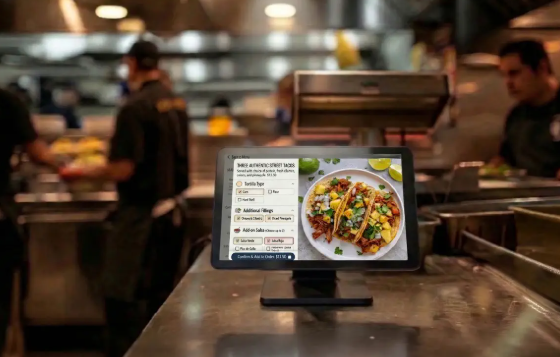
The customer should also have a clear review stage before submitting the order. Showing the selected items and total cost helps customers spot mistakes early, reducing the need for corrections later.
Connect Ordering With Kitchen Workflow
A consistent customer-facing experience depends on what happens after an order is submitted. The kitchen needs to receive the correct items, quantities, and instructions in a useful format.
Restaurants can organise orders by preparation station or product type. For example, beverages may need to reach a different team from hot meals. Clear order identifiers can help staff match items during collection, particularly when several orders are being prepared simultaneously.
Managers should also distinguish between ordering capacity and kitchen capacity. More orders can be accepted only if the team can prepare them at an appropriate pace. If the kitchen is overloaded, the solution may involve better preparation planning, menu simplification, or revised pickup estimates rather than additional ordering channels alone.
Coordinate Dine-In, Takeaway, and Mobile Orders
Different channels may require different rules, but they should share a coherent operational structure. Dine-in orders may be linked to a table, takeaway orders may need a collection number, and mobile orders may require a requested pickup time.
The system should help staff understand the destination and status of each order. If customers can place orders through several channels, managers should consider how incoming orders are prioritised and how the kitchen handles simultaneous demand.
Pickup instructions should be clear. Customers need to know where to wait, how they will be notified, and what information to provide when collecting their food.
Choose Technology That Fits Existing Operations
When assessing a restaurant ordering solution, operators should review menu control, payment options, order tracking, kitchen integration, reporting, and the ability to support the restaurant’s different service formats.
It is also important to understand the total cost of ownership. Subscription fees, devices, installation, payment processing, staff training, and technical support may all affect the budget. A low initial price does not necessarily mean the system will be economical over time.
Restaurants should ask vendors to demonstrate real operating scenarios. Useful tests include changing a menu item, handling a sold-out product, modifying an order, processing a refund, and recovering from a connectivity interruption.
Protect Customer Information
Ordering systems may process contact details, transaction records, and other customer information. Restaurants should understand what data is collected, why it is needed, how long it is retained, and who can access it.
Staff accounts should have appropriate permissions, and devices should be protected from unauthorised access. Any customer-facing forms should request only information necessary for the stated purpose. Privacy and payment-security responsibilities should be discussed with the relevant technology provider.
Train Staff and Monitor Performance
Training should cover more than the standard ordering process. Employees need to understand cancellations, order changes, payment failures, customer questions, and escalation procedures. Managers should also identify who is responsible for menu updates and troubleshooting.
After launch, monitor order accuracy, waiting times, abandoned orders, complaints, and employee feedback. Compare results with the previous process and investigate unexpected changes. A high volume of digital orders is not necessarily a sign of success if fulfilment times or customer satisfaction deteriorate.
Frequently Asked Questions
1. Should every restaurant offer mobile ordering?
No. It depends on customer demand, service style, and whether the business can manage the additional workflow. Some restaurants may benefit more from improving their existing counter or table-ordering process.
2. How can restaurants prevent inconsistent menu prices?
Use a clear source of truth for menu data, assign responsibility for updates, and verify the changes across every active ordering channel before they go live.
3. What is the best way to evaluate a new ordering solution?
Test it against real restaurant scenarios and compare performance, reliability, integration, training requirements, and total cost. Staff and customer feedback should inform the final decision.
Conclusion
A consistent ordering experience depends on accurate menu information, structured order entry, reliable kitchen communication, and clear customer instructions. Restaurants should choose channels that fit their service model and ensure each channel supports the same operational standards. With appropriate training and ongoing measurement, a coordinated ordering strategy can make service more predictable and easier to manage.